















A POS system is the hardware and software businesses use to process customer transactions. Modern POS systems handle payments, update inventory, track staff hours, and generate real-time sales reports.
Australians have made contactless checkout the default. In October 2024, 98% of in-person card payments were contactless (54% tap cards and 44% mobile wallets). If your checkout or reporting still relies on manual steps, those small delays can quickly add up to longer queues, more transaction errors, and end-of-day numbers that are harder to verify.
Without a POS system that integrates payments, sales, and inventory into a single workflow, teams often move between spreadsheets, separate payment terminals, and fragmented reports. Situations like pricing inconsistencies, unexpected stock shortages, or slow financial reconciliation become common, quietly reducing efficiency and profitability.
A modern POS system serves as the operational hub of your business by capturing every transaction, automatically updating inventory, and converting sales activity into clear reporting. It also supports stronger record discipline, as Australian business guidance generally requires companies to keep financial records for at least five years.
Key Takeaways
A POS system combines software and hardware to process sales, record payments, and update inventory and reporting within a single workflow.
Without a POS system, businesses often face manual reconciliation, stock and pricing errors, slower checkout, and weaker visibility into daily sales.
Core POS features like payment processing, inventory tracking, CRM, and offline mode form the baseline checklist when comparing vendors.
A POS system helps Australian businesses manage fast card and contactless payments, maintain GST-ready records, and run consistent multi-site reporting.
What Is a Point of Sale (POS) System?
A POS (point of sale) system combines hardware and software that lets a business process payments, track inventory, and manage sales in one place. The term itself describes the moment and location where a transaction happens, but in practice it refers to the tools running the sale, from the counter terminal to the software logging each line item.
Where a traditional cash register could only record sales, a modern POS system works as a sales transaction platform that calculates totals, applies tax, issues receipts or invoices, and records transactions automatically while updating inventory and customer data.
Think of your POS system as the operational hub connecting the counter to the back office. It keeps sales, stock, and reporting in sync across teams, so you spend less time fixing manual entries and more time running the business with clean, reliable numbers.
How Does a Point of Sale System Work?
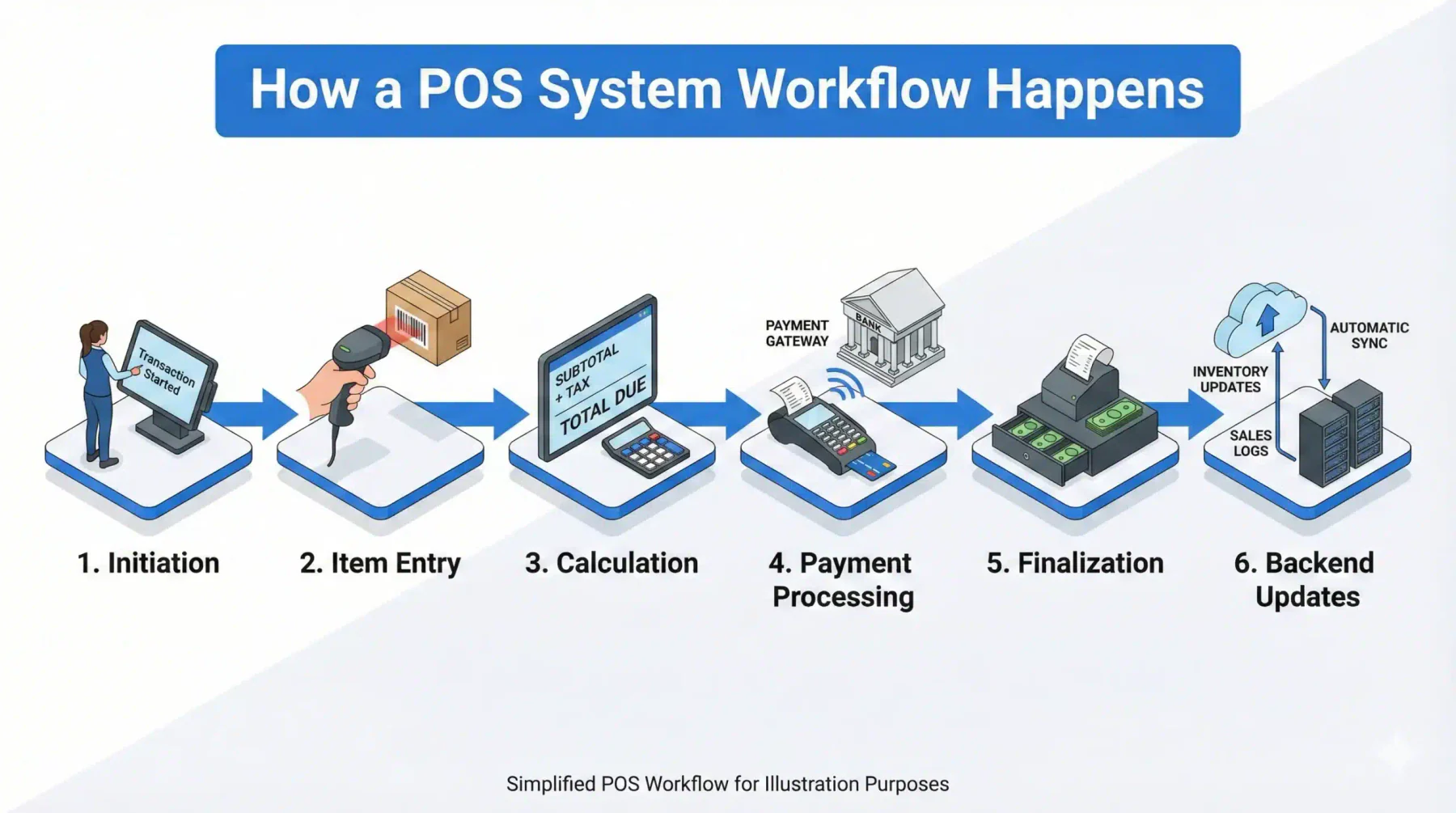
Understanding how a POS system works helps explain its role in daily operations. Although transactions are completed quickly, several steps still happen in the background.
- Initiation: The transaction begins when a customer brings items to the checkout or orders a service. The staff member initiates a new sale on the POS interface.
- Item Entry: Items are entered into the system. This can happen via barcode scanning (retail), selecting items from a touchscreen menu (restaurants), or manual entry. The POS software instantly retrieves the price and product details from the database.
- Calculation: The system calculates the subtotal, adds any applicable sales tax, and applies active discounts or loyalty points. It presents the final total to the customer.
- Payment Processing: The customer chooses a payment method. If paying by card, the card reader encrypts the data and sends it to the payment processor. The processor verifies the funds with the customer’s bank and approves or declines the transaction.
- Finalization: Upon approval, the POS records the sale. It triggers the cash drawer to open (if cash) or prints the credit slip.
- Backend Updates: Crucially, the moment the sale is finalized, the POS updates the inventory count (deducting the sold items) and records the revenue in the sales ledger. If the customer is part of a loyalty program, their purchase history is updated.
Key Components of a POS System
A POS system combines both physical hardware and digital software to create a seamless transaction experience. Whether for retail, hospitality, or services, the system’s core components stay the same.
POS Hardware
The hardware is the physical interface that helps explain what is point of sale in real operations, making it essential for daily transaction processing. It includes:
- POS Terminal/Monitor: The screen where orders are entered and payments are processed, often using a touchscreen interface. This may be a tablet or an all-in-one computer, a critical part of what the point of sale is.
- Barcode Scanner: Essential for item identification in retail, this tool scans product codes to quickly add items to the sale, integral to any point of sales system.
- Credit Card Reader: The device that processes payments through magstripes, EMV chips, or contactless options like Apple Pay, linking directly to the payment processor.
- Receipt Printer: This generates physical receipts, a standard requirement for many businesses, despite the rise of digital receipts. A key part of the POS system workflow.
- Cash Drawer: Still crucial for cash transactions, this is linked to the POS terminal and opens automatically during cash payments.
- Customer Facing Display (CFD): A secondary screen for the customer, showing the transaction details, prompts for tips, or promotional messages.
POS Software
The software powers the entire POS system and manages how transactions and operations are handled. It is typically divided into two main sections:
- Frontend (Register): This is the interface staff use to complete sales, process payments, apply discounts, and issue receipts. It focuses on speed and simplicity to minimize checkout times.
- Backend (Dashboard/Back Office): Accessible via a browser, this is where managers control inventory, review analytics, configure settings, and manage employees. It’s the heart of operations, enabling data-driven decisions in any POS system.
Types of POS Systems

Not all POS systems are the same; each business model requires a tailored solution. Here’s an overview of the main types of point-of-sale systems available today.
On-Premise (Legacy) POS
These POS systems are installed on local servers within your business premises. While they provide complete control over data security, they come with high upfront costs and limited flexibility for updates.
- Pros: No internet connection required; full control over data security.
- Cons: High hardware costs; difficult to update; no remote access.
Cloud-Based POS
A point of Sale system hosted on secure remote servers, often offered as a Software-as-a-Service (SaaS). Cloud-based systems provide real-time access from anywhere, making them highly scalable and easy to integrate.
- Pros: Lower upfront costs; automatic updates; accessible from any device.
- Cons: Requires reliable internet access; some systems may have offline modes.
Mobile POS (mPOS)
These portable POS systems run on smartphones or tablets, commonly used in environments like pop-up shops or food trucks. Mobile POS solutions streamline operations by enabling sales on the go.
- Pros: Portable; reduces line congestion; low hardware footprint.
- Cons: Limited peripheral connectivity compared to traditional systems.
Self-Service Kiosks
POS systems that allow customers to complete transactions independently are typically found in fast-food chains and grocery stores. They reduce the need for staff and speed up the checkout process.
- Pros: Lowers labor costs; increases order accuracy; speeds up transactions.
- Cons: Lacks human interaction; requires intuitive design.
Open-Source POS
These POS systems provide access to the source code, allowing businesses to modify the system. Ideal for those with dedicated technical teams, they offer customization but require ongoing maintenance.
- Pros: Customizable; often free to use.
- Cons: Requires technical expertise; no dedicated support.
Multichannel/Omnichannel POS
Designed to unify sales across both physical stores and e-commerce platforms, these POS systems help businesses manage inventory and customer data in one system.
- Pros: Unified inventory and customer data; supports features like Buy Online, Pick Up In-Store (BOPIS).
- Cons: Complex setup and integration.
What are the Differences between a POS System and an EFTPOS?
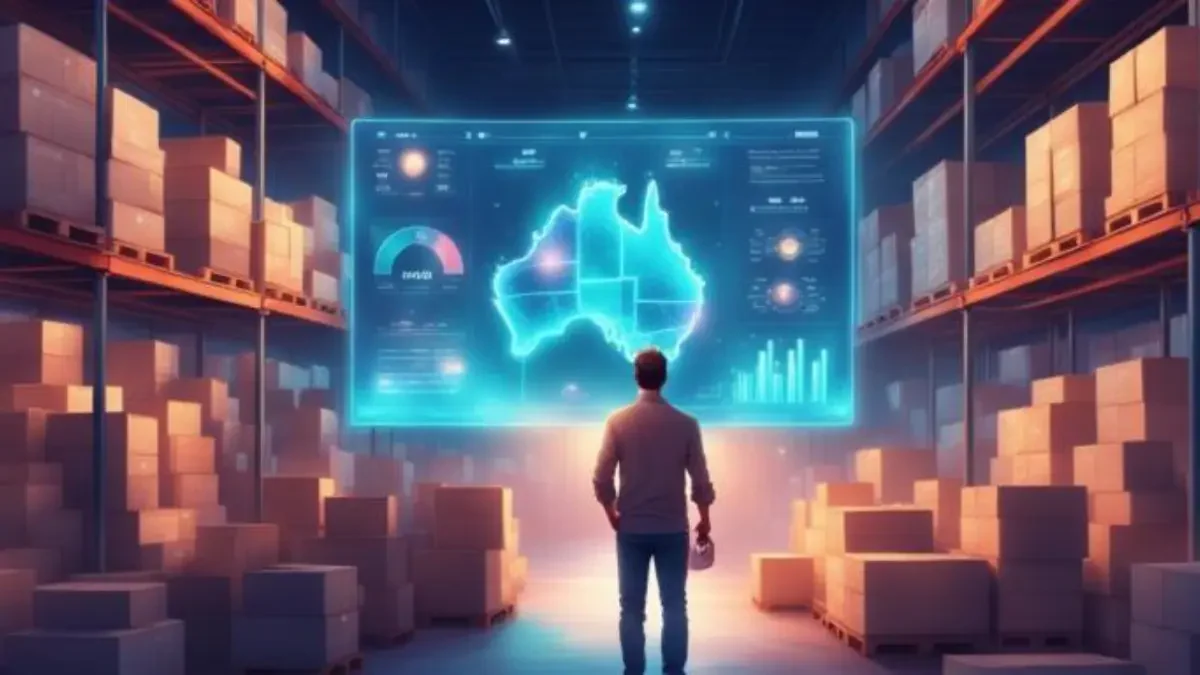
EFTPOS stands for Electronic Funds Transfer at Point of Sale. It is the payment terminal used to process debit and credit card transactions by transferring funds from a customer’s bank to a merchant’s account.
In Australia, the domestic card network is called eftpos, operated by Australian Payments Plus (AP+). It is committed to cost-effective, secure, and reliable payments for businesses and consumers across the country.
One key feature of the eftpos network is Merchant Choice Routing (MCR). This allows merchants to route debit transactions through the lowest-cost network available, reducing payment acceptance costs without affecting the customer experience.
A POS system is a comprehensive solution that handles sales, inventory, and customer data. It combines hardware and software to manage business operations, from tracking stock levels to generating financial reports.
EFTPOS, on the other hand, refers specifically to the payment terminal used to complete card transactions. It is one component within the larger POS system rather than a replacement for it.
In short, a POS system covers the entire sales process while EFTPOS focuses purely on processing payments. For Australian merchants, choosing a POS that integrates with the eftpos network helps lower transaction costs and maintain compliance with local payment standards.
Common POS Software Features
Modern POS software does far more than ring up sales, and knowing which features matter most helps you compare systems with confidence. The list below covers the core capabilities Australian businesses should expect from any solid POS platform today.
- Payment processing: Accepts EFTPOS, credit and debit cards, contactless tap-and-go, and mobile wallets like Apple Pay or Google Pay, all from a single terminal connected to the till.
- Inventory management: Tracks stock in real time, fires low-stock alerts, and updates counts the moment a sale clears, which prevents oversells across single or multiple locations.
- Sales reporting and analytics: Turns daily transactions into clear dashboards covering revenue, top sellers, peak hours, and margins, so owners act on numbers rather than guesses.
- Employee management: Handles staff shifts, role-based permissions, clock-ins, and individual sales performance, giving managers visibility into who is selling what and when.
- Customer relationship management (CRM): Stores purchase history, contact details, and preferences, so frontline staff can personalise service and marketing teams can run targeted campaigns.
- Loyalty programs: Awards points, discounts, or member-only pricing automatically at checkout, which lifts repeat visits and grows average basket size over time.
- Offline mode: Keeps the register running and queues transactions during internet outages, then syncs everything once the connection returns, so sales never stop mid-rush.
- eCommerce and omnichannel sync: Connects your physical store with online sales channels, sharing inventory, pricing, and customer data so a product sold online is instantly removed from in-store stock.
A POS system that ticks most of these boxes will handle daily trading without forcing you to bolt on extra tools later. Therefore, when shortlisting vendors, treat this list as a baseline checklist before moving on to industry-specific extras.
Benefits of Using a Point of Sale Software for Your Business
Investing in a comprehensive POS solution offers Australian businesses significant advantages, including streamlined operations, improved revenue visibility, and stronger compliance with local regulations. Here’s how a point of sale system can transform your business:
- Increased efficiency and speed: A POS system automates functions like pricing and inventory updates, speeding up checkouts and reducing wait times. This boosts revenue potential, especially in high-transaction industries like retail and hospitality.
- Reduced human error: Manual entry often leads to mistakes, but a POS system ensures accurate pricing, tax calculations, and change. This helps prevent shrinkage and supports compliance with Australian GST regulations.
- Real-time data visibility: Cloud-based POS systems give business owners real-time access to sales data, enabling quick decisions on inventory and trends. This ensures businesses can stay agile and responsive to market shifts.
- Enhanced customer experience: A POS system provides fast, efficient transactions and features like loyalty rewards and personalized recommendations. It caters to modern preferences with contactless payments and digital receipts.
- Better inventory control: A POS system helps businesses maintain optimal inventory levels, preventing overstocking or understocking. Predictive analytics also suggest reorder quantities based on sales trends, ensuring stock aligns with demand.
- Tax and compliance support: A POS system automatically calculates and tracks GST, ensuring compliance with Australian tax laws. It generates accurate reports for audits and tax filing, reducing the risk of errors.
- Scalability for growth: Cloud-based POS systems easily scale to support multiple locations and integrate with other tools. This flexibility ensures your system can grow alongside your business, meeting both short-term and long-term needs.

POS Systems for Different Industries

Businesses across various industries rely on POS systems to streamline operations, improve efficiency, and enhance the customer experience. Depending on the business model, a point of sale system can offer tailored features to address specific needs.
Below are the key types of POS systems that cater to different industries, ensuring smooth operations and scalability.
Retail POS
In retail, POS systems are designed to simplify the checkout process and manage inventory effectively. These systems enable quick transactions, automatic price updates, and detailed sales reports that help retailers make data-driven decisions.
Retail POS systems also track stock levels in real time, preventing overstocking or understocking. With integrated loyalty features and a structured customer engagement program, businesses can strengthen long-term relationships by offering rewards, promotions, and personalized incentives.
Hospitality POS (Restaurants, Cafes, Bars)
For the hospitality industry, a POS system enhances both front-of-house and back-of-house operations. These systems allow servers to take orders directly from customers and send them instantly to the kitchen or bar.
POS systems in hospitality also support features like split billing, tips, and staff management, making operations smoother. Real-time inventory tracking ensures that businesses can manage stock effectively, minimizing waste and shortages during peak hours.
For cafes specifically, speed and simplicity are the top priorities. A cafe POS system is built to handle rapid-fire drink orders, modifier options like milk type and shot strength, and quick queue-busting payments — all during a morning rush where every second counts.
Small Business POS
Small businesses often need POS systems that are cost-effective yet feature-rich enough to handle their core operations. These systems provide essential functions such as sales processing, inventory tracking, and customer data management without requiring a large upfront investment.
A POS system for small businesses is often cloud-based, offering accessibility from anywhere and allowing owners to monitor performance remotely. This flexibility helps small business owners focus on growth while maintaining control over their operations.
Multi-Location & Growing Businesses
For businesses with multiple locations, a cloud-based POS system offers centralized management, providing a unified view of sales, inventory, and employee performance across sites. These systems allow real-time updates and synchronization, ensuring consistency in service and product availability.
Additionally, cloud-based POS systems are scalable, making it easy to add new locations without disrupting the business. This scalability supports growth while maintaining operational efficiency across the board.
Challenges and Limitations of POS Systems
While POS systems help businesses improve transaction speed and operational visibility, they also come with practical limitations that should not be overlooked. Understanding these challenges helps businesses choose a system more carefully and prepare the right safeguards before implementation.
- High upfront and ongoing costs: A POS system often requires spending on hardware, software, setup, and training before it delivers value. Subscription fees, add-ons, and support costs can also increase the total cost over time.
- Maintenance and upgrade demands: Businesses need to maintain both the software and the hardware to keep the system secure and reliable. Without regular updates and timely replacements, performance issues can start to affect daily operations.
- System downtime can disrupt sales: When the POS system goes offline, transactions may stop, and customer service can slow down immediately. Hardware failures, software issues, or internet problems can all interrupt business at critical moments.
- Staff need time to adapt: A new POS system often comes with a learning curve, especially when it includes many features and workflows. During the transition period, staff may work more slowly or make more mistakes until they become confident with the system.
- Compliance requirements add pressure: Businesses must ensure their POS system meets payment and data security standards, such as PCI DSS. Managing these requirements can take extra time, effort, and cost, especially for growing businesses.
- Dependence on the vendor: Many businesses rely on their POS provider for system support, updates, and troubleshooting. If the vendor responds slowly, changes pricing, or faces service issues, operations may be affected.
- Limited flexibility in some systems: Not every POS system can adapt well to unique business processes or industry-specific needs. A system with limited customisation may force businesses to adjust their workflows rather than properly supporting them.
How Much Does a POS System Cost in Australia?
POS system costs can vary depending on the size of your business and how advanced your setup needs to be. Small businesses often start with basic cloud-based systems at a lower monthly cost, while larger or multi-location operations usually require more robust solutions with higher subscription and hardware investment.
The total cost of a POS system in Australia depends on your hardware choices, software model, and setup complexity. For a single-register setup, expect an initial hardware investment ranging from around AUD $1,600 to over AUD $3,800.
| Hardware Component | Budget Option (AUD) | Premium Option (AUD) |
|---|---|---|
| Touchscreen Terminal | $800 – $1,200 | $1,500 – $2,000 |
| EFTPOS Terminal | $300 – $400 | $500 – $600 |
| Barcode Scanner | $150 – $250 | $300 – $400 |
| Receipt Printer | $200 – $300 | $400 – $500 |
| Cash Drawer | $150 – $200 | $250 – $300 |
| Total Hardware Estimate | $1,600 – $2,350 | $2,950 – $3,800 |
Beyond hardware, software subscriptions typically range from AUD $50 to $200 per register per month. Some vendors offer one-time licence fees of $1,000 to $3,000 instead. Installation and staff training can add a further $700 to $2,000 to your total setup cost.
When evaluating total cost of ownership, also factor in payment processing fees, hardware warranty cycles, and integration costs with accounting or e-commerce platforms.
How to Choose the Right POS System for Your Business
Selecting the right POS system is a vital, directly impacting your business’s efficiency, customer experience, and growth potential. Here are the key factors to consider when making your choice.
- Scalability: Ensure your POS system scales as your business expands. If you’re planning to open multiple locations or scale your operations, a cloud-based POS system offers management of all stores from a centralized dashboard.
- Cost structure for understanding cost of ownership: While many POS systems offer affordable pricing, be cautious of “free” systems that come with hidden fees. Consider the Total Cost of Ownership (TCO) over the next few years, which includes hardware costs, software subscriptions, and payment processing fees, to avoid unexpected costs.
- Choose a system that is easy to use: A POS system with an intuitive interface allows new employees to learn quickly and process transactions efficiently, improving service speed and reducing training costs. An easy-to-use system lets your staff focus on customer satisfaction rather than struggling with complex technology.
- Support and maintenance for reliable service: When your POS system goes down, especially during busy periods, you need quick support to minimize disruptions. Look for a provider that offers 24/7 customer support, regular software updates, and a comprehensive knowledge base to help resolve any issues promptly, ensuring continuous operations and peace of mind.
- Consider flexibility and future proofing: Some POS systems are designed to work with proprietary hardware, which can offer durability but limits your flexibility. Other systems are hardware-agnostic, allowing you to use standard devices like iPads or PCs.
- Offline mode capability: Internet connectivity aren’t always available. A POS system with an offline mode allows continuous processing transactions even when the connection drops, then syncs all data once connectivity is restored. This should be a non-negotiable consideration when evaluating any cloud-based system.
- Compatibility with Australian accounting software: Your POS system should integrate with the accounting platforms most widely used in Australia. Native integration eliminates the need for manual data exports and removes human errors, keeping your books accurate with minimal manual effort.
- Support for automated GST reporting: Australian businesses are required to apply the 10% GST correctly across all taxable sales and report it accurately. A POS system that automates GST calculation, separates it within transaction records, and produces GST-ready reports saves significant time and reduces the risk of compliance errors.
- Availability of local Australian support: When technical issues arise, response time matters. Prioritize vendors with Australia-based support teams who operate during local business hours and understand the regulatory and payment environment specific to Australia. Local support is also better positioned to assist with state-specific compliance requirements.
If you’re comparing available options, you can explore our list of best POS software in Australia to find the right solution for your business.
Why an ERP-Integrated Point of Sales System Is the Future
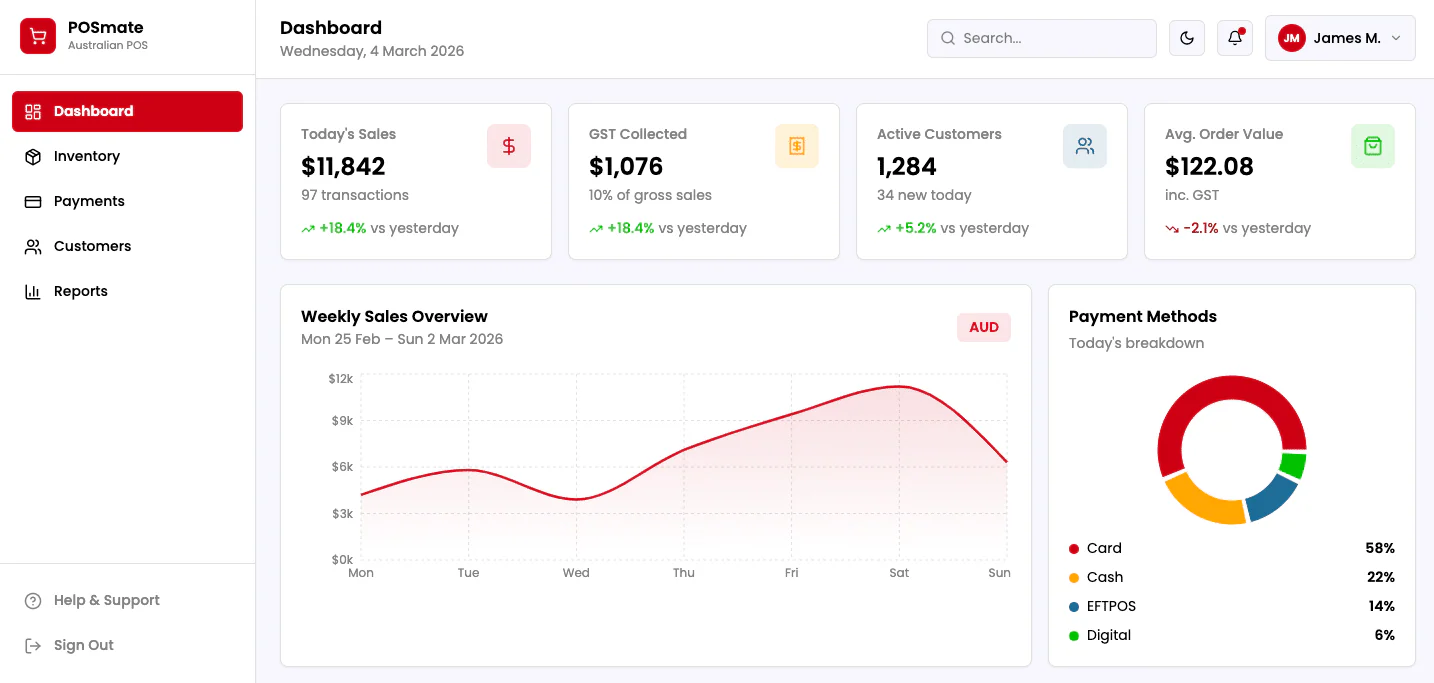
As businesses grow, a standalone POS system often starts to show its limitations. While it can handle transactions and basic inventory updates, other critical processes still run in separate systems, creating gaps across operations.
Many businesses face situations where sales data updates instantly in the POS, but accounting still requires manual reconciliation. Inventory in the store may not match warehouse stock in real time, and financial reports are often delayed because data needs to be compiled from multiple sources. These gaps can slow decision-making and increase the risk of errors.
By integrating POS with an ERP system, businesses can centralise sales, inventory, financial data, procurement, supply chain, and workforce, into one platform. This allows real-time visibility across locations, automatic GST handling, and more accurate reporting without manual input. Teams can work with the same data, reducing inconsistencies and improving operational control.
This approach becomes especially important for businesses with multiple outlets, growing transaction volumes, or inventory managed across different locations. As complexity increases, having disconnected systems can limit scalability.
Instead of relying on separate tools, businesses can benefit from a unified system that connects front-end sales with back-end operations. You can see how HashMicro ERP unifies your POS, inventory, and finance to streamline operations and support better decision-making.
Conclusion
A POS system helps businesses move beyond basic transactions by turning sales activity into useful insights that support daily operations and decision-making.
As operations grow, relying on separate systems can create gaps across sales, inventory, and finance, making it harder to maintain accuracy and consistency. A more integrated approach helps improve visibility, reduce manual work, and support better control across the business.
You can explore how an integrated ERP solution connects your POS, inventory, and financial data in one system to support more efficient operations. Get a free consultation with our experts to find the right setup for your business.
FAQ About POS Systems
What are the GST requirements for POS receipts in Australia?
Under Australian law, any business registered for GST must issue a tax invoice for sales of $82.50 or more. Tax invoices issued by your POS system must include your Australian Business Number (ABN), the date of the sale, a description of the goods or services, the total amount payable, and a clear statement that GST is included, or a line item showing the GST amount separately.
DO I need an EFTPOS machine and a POS system?
If your business accepts card payments, you will need EFTPOS capability, and the most efficient way to manage this is through a POS system that includes integrated processing. An EFTPOS terminal handles the payment, while a POS system manages the broader sale. Both functions operate as a single seamless workflow.
Can I use my phone as a POS system in Australia?
Yes. Mobile POS (mPOS) apps allow smartphones and tablets to function as a point of sale terminal, often paired with a compact Bluetooth card reader to accept EFTPOS, tap-and-go, and mobile wallet payments. Most mPOS apps available in Australia support the EFTPOS network and comply with local payment standards.
Is my data safe in a cloud-based POS system?
Yes, cloud-based POS systems generally provide more security than on-premise setups. They use encryption, tokenization, and secure data centers that follow strict PCI DSS standards, ensuring your business is protected from hardware failures and theft.
Can a POS system help with inventory management?
Absolutely. A POS system automatically tracks inventory, updating stock counts in real-time with each sale. Advanced systems also provide low-stock alerts, vendor management, purchase orders, and support for product variants like size and color.