














Malaysia is moving quickly with e invoicing, and you cannot treat it as a future problem anymore. If you handle payouts, procurements, or distributions, you will run into situations where you must document a payment even when the payee cannot issue the invoice for you.
Self billing is the part that trips people up the most because it flips the usual workflow. You do not wait for the supplier to invoice you. You create the compliant record yourself, then you submit it for validation. If you miss this step in the wrong scenario, you create a compliance gap that can come back during review.
In this article I will walk you through what self-billed e-invoicing means in Malaysia, the exact scenarios where you need it, and the steps you can follow to submit and store it properly. Read until the end because I will also include practical examples that you can mirror inside your own payment runs.
Key Takeaways
Self billing applies only to payment categories listed by LHDN, so you should not use it for every late or missing supplier invoice.
A self billed document becomes an official record only after MyInvois validates it, so you need to fix and resubmit any rejected file.
Complete supplier information reduces rejections and makes reconciliation easier, especially for individuals and foreign suppliers.
If you handle high volume payouts, build a repeatable workflow and align it with recurring payment structures to keep validation and payments in sync.
How to Issue a Self Billed E Invoice Step by Step
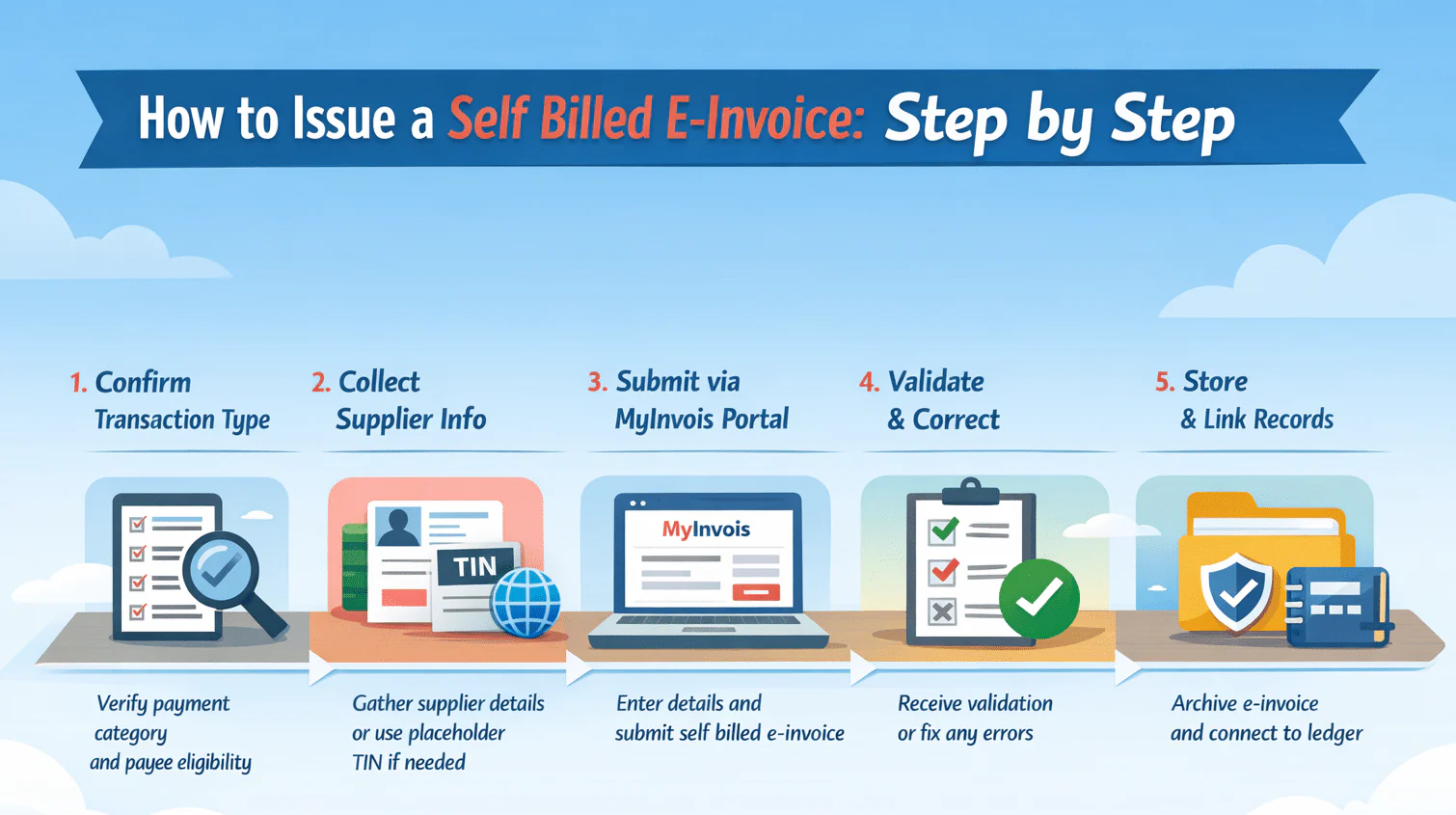
Self billing follows a structured workflow that mirrors a regular submission, but you take responsibility for data preparation.
Step 1 Identify the Transaction Type
Start by confirming that the payment matches one of the prescribed categories. Look at the payee type, the payment purpose, and whether the payee can issue an invoice through the portal. If it does not match, stop and reassess.
Step 2 Gather Supplier Details
Prepare the payee details you will insert as supplier information. Capture the name, address, and identifiers where available. Use the placeholder only when the payee genuinely lacks a Malaysia TIN, such as a foreign supplier.
For Malaysian entities, use real identifiers. For individuals, use accurate identification details and keep your records tidy.
Step 3 Create and Submit Through MyInvois
Log in to the portal and select the self billed document type. Fill in your buyer details as issuer and input the payee details as supplier.
Describe the transaction clearly. Add line items that reflect the payment reason such as commission, subscription, interest, dividend, settlement, or claim. If you pay in foreign currency, record the foreign amount and the ringgit equivalent based on your applied exchange rate.
If you handle high volume submissions, connect your internal system through the MyInvois API so you can submit in batches and avoid repetitive manual entry.
Step 4 Validation by the Portal
After submission, the portal checks the document. If it validates, you receive the reference number, validation timestamp, and QR code. If it rejects, fix the issue and resubmit immediately. Do not treat a rejected record as compliant.
Step 5 Store for Record Keeping
Malaysia requires you to retain tax records for long periods, so store the validated file with its reference. Link it to the payment transaction and ledger entry. This will save you time during audits and reconciliation.
Data Checklist That Prevents Portal Rejections
Before you submit any self billed document, pause for a quick internal check. Most validation issues do not come from complex tax rules. They come from incomplete or inconsistent data.
If you clean your input before submission, you reduce rejection cycles and save your team from unnecessary rework.
For Malaysian Companies and Registered Businesses
Make sure you confirm the correct tax identification number. Use the official SSM registration number exactly as registered. Enter the registered business address, not a branch address unless it is officially recorded. Double check spelling of the legal entity name. Even minor variations can create confusion in reconciliation.
For Malaysian Individuals
Use the full name as per identification records. Ensure identification details match your internal payment records. Confirm the address if required for your documentation standard.Do not assume that individual payees do not need accurate data. Inconsistent identification details often lead to documentation mismatches during review.
For Foreign Suppliers
Use the legal entity name exactly as stated in the supplier invoice.
Insert the country of origin clearly. Apply the allowed placeholder tax identifier only when the supplier genuinely does not have a Malaysia TIN. Record both the foreign currency amount and the ringgit equivalent using your applied exchange rate.
Internal Consistency Check
Make sure the payment amount matches the document amount exactly. Confirm the transaction description reflects the actual purpose of payment such as commission, subscription, dividend, or settlement. Ensure the submission timing aligns with your payment release schedule.
A few extra minutes spent reviewing these fields can prevent repeated submission attempts. If your team processes high volumes, building this checklist into your approval workflow will significantly reduce validation friction.
Self Billed E Invoice Examples by Scenario
Examples make the rules easier to apply in real operations.
Example 1 Purchase from a Foreign Supplier
Your Malaysia company pays a US based SaaS vendor for a monthly subscription. The vendor invoice exists, but the vendor cannot issue a validated invoice through the portal.
You create a self billed document listing your company as issuer and the foreign vendor as supplier. You use the allowed placeholder supplier identifier and you describe the subscription period clearly. You record the USD amount and the ringgit equivalent using your exchange rate.
Example 2 Commission Payment to an Agent
You pay a monthly commission to an individual agent. The agent does not issue invoices through the portal.
You create a self billed document for the commission cycle and include the correct identification details. You describe the commission period so you can reconcile it later against your commission statement.
Example 3 E Commerce Platform to Seller
Your platform remits weekly proceeds to a seller. You issue a self billed document for the settlement amount.
You include the settlement period and internal transaction references so your team can trace disputes and reconcile payouts quickly.
Types of Self Billed Documents
Self billing also covers adjustments, not only the original record.
You issue a self billed invoice as the primary document. If you need to reduce the amount later, you issue a self billed credit note that references the original validated record. If you need to increase the amount, you issue a self billed debit note linked to the original record. In specific refund situations, you may also issue a self billed refund note. Each document needs validation through the same portal before you treat it as an official tax record.
Smart System Helps Manage Self Billed E Invoices
If you manage large volumes, manual processing will slow your team down and increase your risk of mistakes. The workload grows fast when you pay thousands of commissions, process many foreign supplier invoices, or run marketplace settlements.
A capable system should help you classify payments, pull payee details automatically, apply placeholders correctly, submit documents in batches through the API, track validation status, and archive validated records with clean links to the ledger.
When you evaluate solutions, look for a platform that supports the full lifecycle and makes the workflow auditable. That is where the real operational value sits, beyond basic compliance.
Conclusion
Self billing in Malaysia is not an edge case. It is part of the mainstream e invoicing framework, and it affects more payment types than many teams initially expect. When you understand the nine prescribed categories, prepare accurate payee data, and submit documents through the portal at the right time, you protect both your tax position and your audit trail.
Instead of treating self billing as an administrative burden, treat it as a structured finance control. When your process is clear and consistent, documentation stops being reactive and becomes part of your standard payment discipline.
Frequently Asked Questions About Self Billed E-Invoice
When do you need a self billed e invoice in Malaysia?
You need to issue a self billed e invoice only when the payment falls under one of the nine prescribed categories listed by LHDN. If the transaction does not fall within those categories, self billing does not apply.
What if the supplier can issue a validated invoice?
If the supplier is able to submit a valid invoice through MyInvois, you should use that validated document and avoid creating a duplicate self billed record.
What information should you prepare before submission?
Prepare the payee’s legal name, address, and tax identifiers where available. Use the placeholder EI00000000010 only for foreign suppliers who do not have a Malaysia TIN.
What should you do if MyInvois rejects your submission?
Review the error message, correct the inaccurate or incomplete fields, and resubmit the document until it is validated. A rejected record is not considered compliant.
How can you manage self billing at high volume?
Build a repeatable workflow and use batch submission through the MyInvois API to keep payment processing and validation status aligned, especially when handling recurring payment structures.