















With the complexities of financial budgeting, many businesses find themselves overwhelmed by the sheer volume of data, unexpected expenses, and the need for precise forecasting. How can you ensure your financial health is not just maintained, but optimized?
Business budgeting software has emerged as a vital solution to address these challenges. These tools offer a streamlined approach to managing finances, allowing businesses to track expenses, forecast future financial scenarios, and make informed decisions.
According to Allied Market Research, the global accounting and budgeting software market is expected to reach $47.97 billion by 2031, with an annual growth rate of 11.4%. This growth shows the increasing need for budgeting tools in financial management.
However, with numerous software options available, selecting the right one can be challenging. Therefore, this article will give Singapore’s 20 best business budgeting software to help you find the perfect tool to enhance your business’s financial management.
Key Takeaways
|
Best Business Budgeting Software Shortlist
- HashMicro: Best overall for comprehensive ERP integration
- QuickBooks: Best for freelancers and small businesses
- FreshBooks: Best for expense tracking for small businesses
- Scoro: Best for project-based businesses
- Vena Solutions: Best for Excel-based budgeting and reporting
What is Business Budgeting Software and Why is It Important?
Business budgeting software is a digital tool that helps businesses plan, manage, and track their financial resources. This software integrates various financial processes, enabling companies to create budgets, monitor spending, and forecast future financial performance.
It consolidates financial data from different departments, automates calculations, and generates comprehensive reports that provide real-time insights into a company’s financial health. Below are some of the benefits of implementing business budgeting software:
- Automation of budgeting tasks reduces manual effort and minimizes errors, making the budgeting process more efficient.
- The software helps identify areas where costs can be reduced, optimizing overall financial management.
- Enables accurate financial forecasting, helping businesses plan for future expenses and revenues.
- Businesses can track their financial performance in real-time, allowing for timely adjustments and better financial control.
- Detailed financial reports and insights support informed decision-making, leading to better strategic planning.
- Ensures adherence to financial regulations and standards, reducing the risk of non-compliance.
20 Best Business Budgeting Software in Singapore
With a clear understanding of what business budgeting software is and the numerous benefits it brings, the next step is choosing the system for your business. Here are the 20 best budgeting software for business in Singapore, highlighting their unique features and advantages.
1. HashMicro Business Budgeting Software
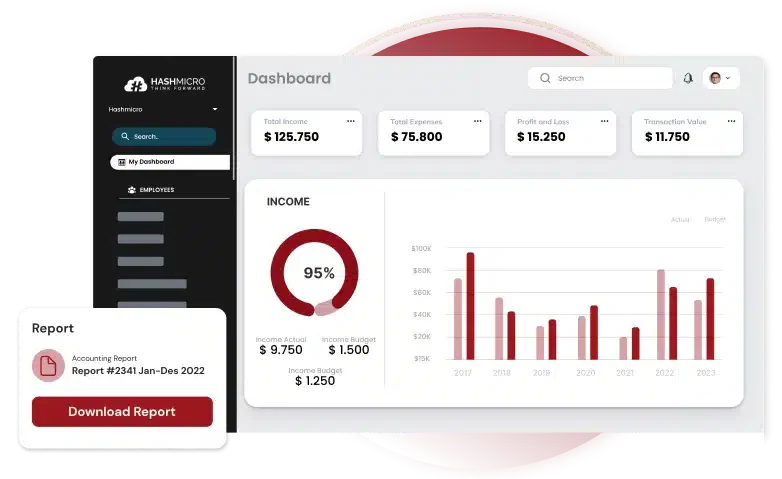
HashMicro Business Budgeting Software is an accounting solution that helps businesses manage financial processes efficiently. The software integrates various financial functions into a single platform, including budgeting, accounting, forecasting, and financial reporting.
HashMicro also offers a free product tour and consultation without commitment, allowing businesses to explore the software’s features as a localized solution that complies with the Inland Revenue Authority of Singapore (IRAS) regulations.
HashMicro is trusted by notable companies, including Forbes, Bank of China, and Changi Airport Group. These endorsements highlight the software’s reliability and effectiveness in managing complex financial operations of various industries.
Below is the comprehensive suite of features that HashMicro Accounting Software offers:
- Bank Integrations & Auto Reconciliation: This feature integrates with various banks, ensuring financial records are always up-to-date. Auto reconciliation reduces the risk of errors and saves time, allowing businesses to maintain accurate financial data.
- Budget Forecast: These tools enable businesses to predict future financial performance based on historical data and market trends. This feature helps create precise budget plans and set realistic financial goals.
- Budget S Curve: This feature visually represents budget progress over time. This tool is essential for monitoring financial performance against the budget, identifying variances, and making necessary adjustments to stay on track.
- Financial Ratio Analysis: HashMicro includes tools for calculating various financial ratios. These ratios help analyze profitability, liquidity, and solvency, clearly showing financial stability and performance.
- Financial Statement with Budget Comparison: This feature allows businesses to generate financial statements that compare actual performance against the budget. It enables management to identify areas and take corrective actions.
- Cash Flow Reports: Cash flow reports provide detailed insights into the inflows and outflows of cash within the business. These annual business reports are critical for maintaining liquidity and planning future expenditures.
Pros:
- User-friendly interface
- Extensive customization options to fit business needs
- Seamlessly integrates with other systems and modules
- Compliance with IRAS regulations
- Unlimited users without additional user fee
- Lifetime after-sales service and maintenance
Cons:
- Implementation can be lengthy for businesses with more complex needs
- Free demo queue may take time due to high demand
Interested in learning more about how HashMicro can transform your financial management? Click the banner below to explore the pricing schemes and find the perfect solution tailored to your business needs.
NetSuite offers cloud business budgeting software that automates financial processes and provides real-time visibility into financial performance. It consolidates financial data across various departments, automating billing, invoicing, and payment processes. The features offered include financial and operational dashboards, multi-currency and multi-company management, robust reporting and analytics, and advanced financial management tools such as revenue recognition, budgeting, and forecasting. Pros: Cons: Sage Accounting is a cloud-based business financial budgeting software that automates invoice generation, expense tracking, and cash flow management. It offers features in invoicing, bank reconciliation, expense management, and cash flow forecasting. It also provides tools for inventory management, payroll processing, and compliance with tax regulations. Its comprehensive support resources make it a practical choice for businesses looking to enhance their financial management capabilities. Pros: Cons: QuickBooks offers software for business budgeting that streamlines financial management by automating tasks. The software consolidates data, automates billing and payments, and provides real-time financial reporting and analytics. QuickBooks features include invoicing, expense tracking, payroll management, and tax preparation. It also offers budgeting and forecasting tools, time tracking, and inventory management, making it versatile for managing business finances effectively. Pros: Cons: Xero offers business budgeting software for managing invoicing, bank reconciliation, bookkeeping, and more. The system automates financial tasks, integrates with bank accounts for real-time data synchronization, and provides detailed financial reports and dashboards. Xero’s features include invoicing, expense claims, bank reconciliation, and payroll management. It also offers project management tools, multi-currency support, and a robust app marketplace for additional integrations. Pros: Cons: SAP S/4HANA offers budgeting software for large companies that integrates various processes to streamline operations. The system integrates financial data across the company, automating accounting processes and delivering advanced analytics and reporting capabilities. SAP S/4HANA’s features include financial planning and analysis, accounting and financial close, treasury and risk management, and collaborative finance operations. It also supports multi-currency and multi-company management, making it suitable for global enterprises. Pros: Cons: FreshBooks provides business budgeting and forecasting software that simplifies financial management. The software integrates financial data, automates repetitive tasks, and provides detailed reports with real-time financial insights. Key features of FreshBooks include customizable invoicing, expense tracking, time tracking, and project management. It also offers payment processing, automated reminders, and financial reporting tools. Pros: Cons: Workday Adaptive Planning is adaptive insights budgeting software for businesses that streamline financial planning, budgeting, and forecasting processes. The system integrates financial data, automates planning workflows, and provides analytics and reporting. Workday Adaptive Planning offers flexible budgeting and forecasting, scenario planning, financial consolidation, and workforce planning. The software’s advanced capabilities and scalability make it an ideal solution for optimizing financial management. Pros: Cons: Scoro is one of the best rank business budgeting software that includes budgeting and financial management tools. The software works by integrating project management, CRM, and financial management in a single platform. Scoro’s features include budgeting, invoicing, expense tracking, and financial reporting. It also offers project management tools, time tracking, and CRM capabilities. Scoro’s integrated approach to business management makes it a versatile tool for businesses. Pros: Cons: Centage offers a business budgeting software focused on automated budgeting, forecasting, and financial reporting. The system integrates financial data, automates budgeting processes, and provides real-time insights through detailed reports and dashboards. Key features of Centage include budgeting, forecasting, financial reporting, and scenario planning. It also offers tools for performance management and data visualization. Centage is ideal for businesses looking to enhance financial planning and analysis capabilities. Pros: Cons: Prophix offers project budget management tools for budgeting, forecasting, and financial reporting. The software consolidates financial data, automates planning processes, and provides real-time insights through advanced analytics and reporting. Prophix’s features include budgeting, forecasting, financial reporting, and financial consolidation. It also offers tools for performance management, workflow automation, and data visualization, making it an ideal solution for businesses seeking to optimize their financial management. Pros: Cons: Anaplan is cloud-based business budgeting software with budgeting, forecasting, and financial planning tools. The software integrates financial data, automates planning workflows, and offers real-time analytics and collaborative planning capabilities. Anaplan offers flexible budgeting and forecasting, scenario planning, financial consolidation, and collaborative planning. It also provides intuitive dashboards and data visualization tools. Pros: Cons: Vena Solutions is an Excel-based business budgeting and forecasting software that leverages the familiarity of Excel to streamline financial planning processes. The system automates budgeting workflows, consolidates financial data, and provides real-time insights. Vena’s features include budgeting, forecasting, financial reporting, and financial consolidation. It also offers tools for performance management, scenario planning, and data visualization. Vena is a practical choice for businesses looking to enhance their financial planning and analysis. Pros: Cons: Jedox is a cloud-based software for business budgeting that offers budgeting, forecasting, and financial planning tools. It integrates with various data sources to provide real-time insights and streamline financial processes. Essential features of Jedox include budgeting, forecasting, financial reporting, and financial consolidation. The software also offers tools for performance management, scenario planning, and data visualization. Pros: Cons: Spendesk is business budgeting software that includes budgeting and expense-tracking tools. The software integrates financial data, automates expense reporting, and offers detailed financial reports and dashboards. Spendesk’s features include budgeting, expense tracking, approval workflows, and real-time spend analysis. The software also offers tools for payment processing, receipt management, and financial reporting. Pros: Cons: Mosaic Tech is an adaptive insights budgeting software for business that provides tools for budgeting, forecasting, and financial planning. The system integrates financial data and offers real-time insights through advanced analytics and reporting. The features offered by Mosaic Tech include budgeting, forecasting, financial reporting, and scenario planning. It also provides intuitive dashboards and collaboration tools, making it easier for teams to work together on financial plans. Pros: Cons: PlanGuru offers project budget management tools to simplify financial planning by automating budgeting processes and providing real-time insights. The system integrates financial data, automates planning workflows, and offers advanced analytics and reporting capabilities. PlanGuru’s features include budgeting, forecasting, financial reporting, and scenario planning. It also offers tools for performance management and data visualization. PlanGuru’s advanced features make it an ideal choice for businesses looking to enhance their financial management. Pros: Cons: Datarails is Excel-based business financial budgeting software that enhances planning processes by automating data consolidation and providing real-time insights. The software leverages Excel’s familiarity to streamline budgeting, forecasting, and reporting tasks. Key features of Datarails include automated data consolidation, budgeting, forecasting, financial reporting, and scenario planning. It also offers tools for performance management and data visualization. Pros: Cons: OneStream is a budgeting software for large companies that provides budgeting, forecasting, and financial consolidation tools. The system consolidates financial data, automates planning processes, and offers insights to facilitate strategic decision-making. The features offered by OneStream include budgeting, forecasting, financial consolidation, and financial reporting. It also provides tools for performance management, workflow automation, and data visualization. Pros: Cons: Float is one of the best business budgeting software that simplifies financial planning by automating cash flow projections and providing real-time insights into financial health. The system automates data synchronization and offers detailed financial reports. Float’s features include cash flow forecasting, budgeting, scenario planning, and financial reporting. It also provides tools for invoice tracking, expense management, and real-time cash flow monitoring. Pros: Cons: An adequate budget is crucial for guiding a business toward its financial goals and ensuring resource allocation aligns with strategic priorities. Here are the essential steps in the budgeting process: By following these steps, businesses can create a well-structured and realistic budget that supports their strategic objectives, ensures efficient resource allocation, and provides a clear roadmap for financial success. Selecting the right business budgeting software is crucial for enhancing your financial management and ensuring long-term success. Here are the steps to help you find the software that best fits your business needs: Effective budgeting and financial management are crucial for maintaining stability and driving growth. Selecting the right business budgeting software can significantly improve the efficiency and accuracy of your financial operations. HashMicro Accounting Software provides robust tools to streamline your financial processes, ensures compliance with Singapore regulations, and integrates seamlessly with other business systems. Ready to see how HashMicro can transform your business’s budgeting and financial processes? Sign up for a free demo and leverage this hands-on experience to see how it can be tailored to meet your business’s needs. The best software for creating a budget varies based on business size and needs. QuickBooks and Xero are ideal for small businesses and freelancers. NetSuite and Sage Intacct offer advanced budgeting tools to growing businesses. HashMicro and SAP S/4HANA provide extensive financial planning and analytics for large enterprises. The best software for creating a budget varies based on business size and needs. QuickBooks and Xero are ideal for small businesses and freelancers. NetSuite and Sage Intacct offer advanced budgeting tools to growing businesses. HashMicro and SAP S/4HANA provide extensive financial planning and analytics for large enterprises. The best budgeting method for a business depends on its specific needs, industry, and financial goals. Here are some commonly used budgeting methods:

2. NetSuite
3. Sage Accounting
4. QuickBooks
5. Xero Business Budgeting Software

6. SAP S/4HANA

7. FreshBooks

8. Workday Adaptive Planning
9. Scoro

10. Centage Business Budgeting Software

11. Prophix

12. Anaplan

13. Vena Solutions

14. Jedox

15. Spendesk Business Budgeting Software

16. Mosaic Tech

17. PlanGuru

18. Datarails

19. OneStream

Dashboard configuration difficulties20. Float Business Budgeting Software

Steps in the Budgeting Process
Selecting the Right Business Budgeting Software for Your Business

Determine whether you need basic budgeting and accounting features or more advanced functionalities like multi-currency support, financial consolidation, and extensive customization options.
Identify business budgeting software features, such as invoicing, expense tracking, forecasting, and multi-currency support. Consider any industry-specific requirements and compliance needs that the software must meet.
Ensure the chosen software integrates seamlessly with your existing systems, such as CRM, ERP, or payroll, to maintain smooth data flow and comprehensive financial oversight.
Look for software that can scale with your business growth and offer customization to adapt to your specific requirements to ensure that the software can handle increasing data as your business expands.
Opt for software with a user-friendly interface and comprehensive customer support. This ensures a smooth transition and ongoing assistance, significantly enhancing implementation and utilization.
Read user reviews to understand the experiences with the software. Seek recommendations from industry peers or financial advisors who can provide insights based on their experiences and expertise.
Many software vendors offer free trials or demos. Use these opportunities to test the software’s functionality, ease of use, and suitability for your business before making a final decisionConclusion

FAQ About Business Budgeting Software
What software do companies use for budgeting?
Which software is best used to create a budget?
Which budgeting method is best for business?
1. Zero-Based Budgeting: Zero-based budgeting requires justifying all expenses from scratch each period, ensuring efficient resource allocation.
2. Activity-Based Budgeting: Activity-based budgeting focuses on budgeting for activities that incur costs, providing detailed expense tracking.
3. Value Proposition Budgeting: Value proposition budgeting ensures that all expenditures provide value to the business.
4. Flexible Budgeting: Flexible budgeting adjusts budget figures based on changes in actual revenue levels, making it adaptive for businesses with fluctuating revenues and costs.